
168 lines
6.8 KiB
Markdown
168 lines
6.8 KiB
Markdown
# Nederburg theme for hugo
|
||
|
||
Nederburg is a fast and secure theme.
|
||
|
||
This Hugo theme was ported from [competethemes](https://www.competethemes.com/tracks/).
|
||
|
||
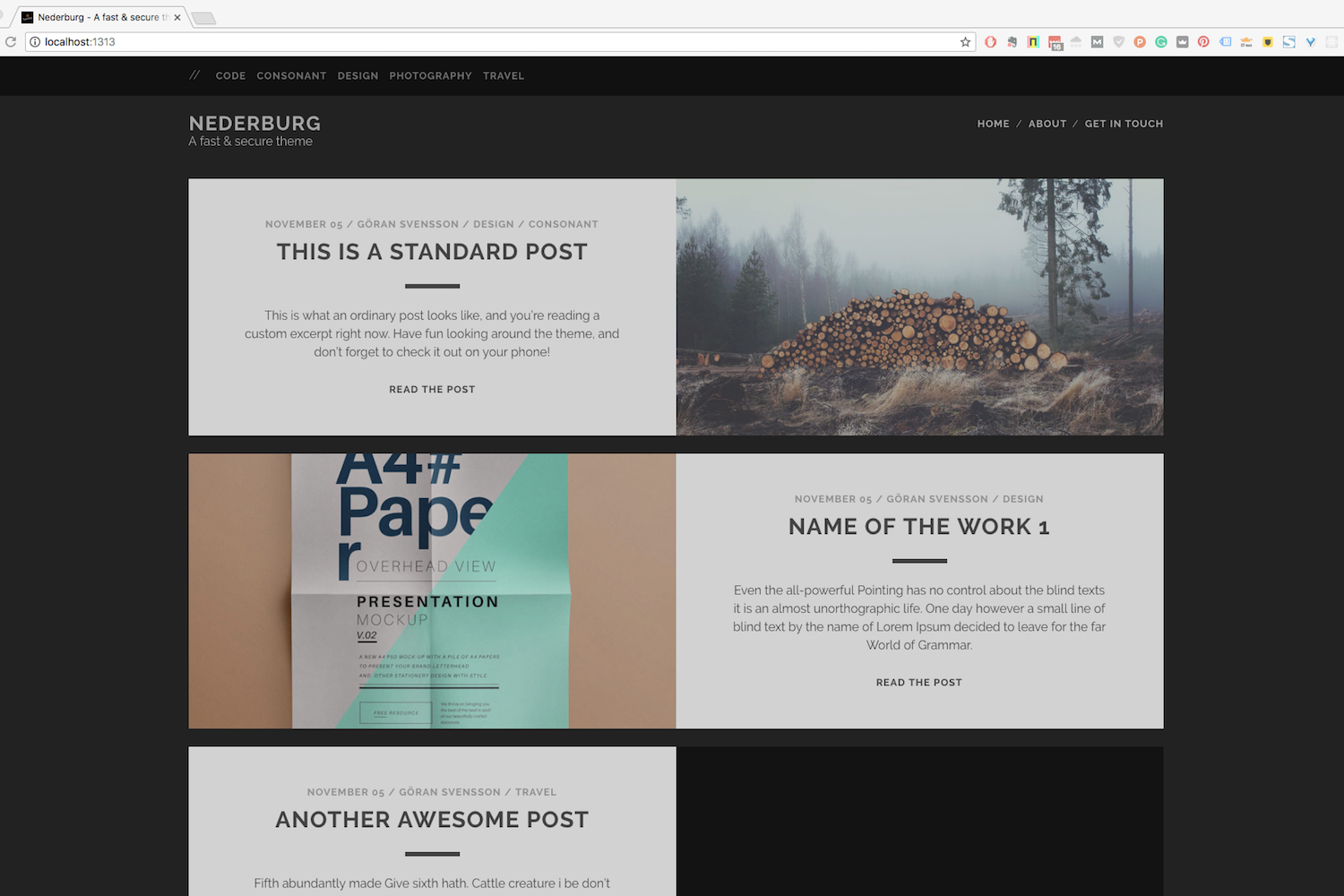
|
||
|
||
## Installation
|
||
|
||
Go to the directory where you have your Hugo site and run:
|
||
|
||
```
|
||
$ mkdir themes
|
||
$ cd themes
|
||
$ git clone https://github.com/appernetic/hugo-nederburg-theme.git
|
||
```
|
||
|
||
For more information read the official [setup guide](https://gohugo.io/overview/installing/) of Hugo or use [Appernetic](https://appernetic.io/).
|
||
|
||
## Configuration
|
||
|
||
After installing the Nederburg theme successfully, we recommend you to take a look at the [exampleSite](https://github.com/appernetic/hugo-nederburg-theme/tree/master/exampleSite) directory. You will find a working Hugo site configured with the Nederburg theme that you can use as a starting point for your site.
|
||
|
||
First, let's take a look at the [config.toml](https://github.com/appernetic/hugo-nederburg-theme/tree/master/exampleSite/config.toml). It will be useful to learn how to customize your site. Feel free to play around with the settings.
|
||
|
||
### Gravatar
|
||
|
||
To have an image in your author bio shown after posts, go to [Gravatar](https://gravatar.com/) and configure it and then add the email address that you have associated with it in the email section in settings:
|
||
|
||
```toml
|
||
email = "your@gravatar.email"
|
||
```
|
||
|
||
If you are using the **Multiple Writers Features** the Gravitar email address will be taken from the `writers."Writer Name".email` parameter. If you are not using the Multiple Writers Feature and you set the front matter `writer` property to any value (including blank) the `.Site.Params.social.email` configuration will be used if it is set other wise the `.Site.email` property will be used.
|
||
|
||
### Style
|
||
|
||
Nederburg uses the minified production version of the style sheet from the wordpress version.
|
||
|
||
### More style customizations?
|
||
|
||
Create `css/custom.css` in your `<<base dir>>/static` folder and add all your custom styling.
|
||
|
||
### Comments
|
||
|
||
The optional comments system is powered by [Disqus](https://disqus.com). If you want to enable comments, create an account in Disqus and write down your shortname in the config file.
|
||
|
||
```toml
|
||
disqusShortname = "your-disqus-short-name"
|
||
```
|
||
|
||
You can disable the comments system by leaving the `disqusShortname` empty.
|
||
|
||
### Google Analytics
|
||
|
||
You can optionally enable Google Analytics. Type your tracking code in the ``.
|
||
|
||
```toml
|
||
googleAnalytics = "UA-XXXXX-X"
|
||
```
|
||
|
||
Leave the `googleAnalytics` key empty to disable it.
|
||
|
||
### Make the contact form work
|
||
|
||
Since this page will be static, you can use [formspree.io](//formspree.io/) as proxy to send the actual email. Each month, visitors can send you up to one thousand emails without incurring extra charges. Begin the setup by following the steps below:
|
||
|
||
1. Enter your email address under 'email' in the [`config.toml`](https://github.com/appernetic/hugo-nederburg-them/tree/master/exampleSite/config.toml)
|
||
2. Upload the generated site to your server
|
||
3. Send a dummy email yourself to confirm your account
|
||
4. Click the confirm link in the email from [formspree.io](//formspree.io/)
|
||
5. You're done. Happy mailing!
|
||
|
||
## Multiple Writers Features
|
||
|
||
Thanks to Lukas Herman's PR there is now a multiple writers feature. In order to support multiple writers, an extra key, "writers" is added, in config.toml. The format looks like the following:
|
||
|
||
```toml
|
||
[params.writers."Göran Svensson"]
|
||
link = "https://appernetic.io/"
|
||
email = "goran@molnsys.com"
|
||
bio = [
|
||
"Göran is an avid blogger and the founder of <a href='https://appernetic.io/'>Appernetic.io</a>. This is the author bio shown after posts."
|
||
]
|
||
facebook = "full Göran profile url in facebook"
|
||
googleplus = "full profile url in googleplus"
|
||
twitter = "full profile url in twitter"
|
||
linkedin = "full profile url in linkedin"
|
||
stackoverflow = "full profile url in stackoverflow"
|
||
instagram = "full profile url in instagram"
|
||
github = "full profile url in github"
|
||
pinterest = "full profile url in pinterest"
|
||
```
|
||
|
||
If you have a writer and set it in the front matter of the post markdown file it will override the author in the config. See the exampleSite folder for a working solution. Here is an example of a front matter entry for the writer defined above.
|
||
|
||
```toml
|
||
writer = "Göran Svensson"
|
||
```
|
||
|
||
If you do not define a writer in the front matter the post will default to the `.Site.Author` and use the `.Site.Params.social` configuration entries for the Author links.
|
||
|
||
## Images
|
||
|
||
Default is to use the static folder for images. If you want to have images in the post folder you unmark the seetings in the config file.
|
||
|
||
```toml
|
||
#UsePostImgFolder = true
|
||
```
|
||
### Privacy settings for Google Analytics
|
||
|
||
Thanks to [mstroh76](https://github.com/mstroh76) we now have privacy settings for analytics. This is how you configure it (included in exampleSite config.toml):
|
||
|
||
```toml
|
||
[privacy]
|
||
# Google Analytics privacy settings - https://gohugo.io/about/hugo-and-gdpr/index.html#googleanalytics
|
||
[privacy.googleAnalytics]
|
||
# set to true to disable service
|
||
disable = false
|
||
# set to true to meet General Data Protection Regulation (GDPR)
|
||
anonymizeIP = false
|
||
respectDoNotTrack = false
|
||
useSessionStorage = false
|
||
```
|
||
|
||
### Nearly finished
|
||
|
||
In order to see your site in action, run Hugo's built-in local server.
|
||
|
||
```
|
||
$ hugo server
|
||
```
|
||
|
||
Now enter [`localhost:1313`](http://localhost:1313) in the address bar of your browser.
|
||
|
||
|
||
## Things to do and not (yet) implemented
|
||
|
||
- Add the possibility for a description for each category.
|
||
- ~~Add pagination to the front page.~~
|
||
- Add dropdown menu option to the left sub menu.
|
||
- Add previous next pagination in blog post.
|
||
- Add a search function.
|
||
- Do a SEO check of site structure and code
|
||
- Page speed check
|
||
- ~~Add a default favicon~~
|
||
- Check that Disqus don’t break anything.
|
||
|
||
## Contributing
|
||
|
||
Have you found a bug or got an idea for a new feature? Feel free to use the [issue tracker](https://github.com/appernetic/hugo-nederburg-theme/issues) to let me know. Or make directly a [pull request](https://github.com/appernetic/hugo-nederburg-theme/pulls).
|
||
|
||
## License
|
||
|
||
This port is released under the [GPL License, either version 2](https://www.gnu.org/licenses/old-licenses/gpl-2.0.txt), or (at your option) any later version. See the LICENSE file for details.
|
||
|
||
## Thanks
|
||
|
||
Thanks to [Steve Francia](https://github.com/spf13) for creating Hugo and the awesome community around the project. And also thanks to [competethemes](https://www.competethemes.com/tracks/) for creating this awesome theme.
|
||
|
||
## Sponsors
|
||
|
||
List of all the great people and organisations that help us fund this open source work.
|
||
|
||
If you want to help support check out my Patreon @ https://www.patreon.com/appernetic
|
||
|
||
[Timothy D. Swieter](https://github.com/Swieter)
|